The best way to introduce AI notetakers, like Owl Practice’s Smart Notes, in therapy is to explain the tool before using it, obtain informed client consent, answer privacy questions clearly, and give clients a pressure-free way to decline. Because therapy involves sensitive personal information, AI documentation should be introduced as part of a trust and confidentiality conversation.
Before using an AI notetaker with a client, you should clearly explain:
- What it does and why you are using it
- How it impacts compliance and privacy
- How it impacts clinical decision making
This guide covers how to introduce AI note-taking tools like Smart Notes, discuss privacy considerations, address common client concerns, and respond when a client does not provide consent.
Why Do Therapists Use AI Notetakers in Sessions?
Therapists like you might use AI notetakers to reduce documentation time, limit manual notetaking, be more present in sessions, create draft clinical notes more efficiently, and have a more polished note. The goal is not to automate care. It is to help you spend less time typing and more time focused on clients.
Therapy notes are essential for continuity of care, but documentation can add hours of administrative work to your week. AI documentation tools can help reduce that burden.
When used thoughtfully, AI notetakers may help you:
- Stay more present during sessions
- Save hours on documentation
- Capture important themes while they are fresh
- Improve continuity between appointments
- Create a more consistent documentation workflow
With Smart Notes, you can generate a draft clinical note while staying in control of the final documentation.
Smart Notes is also incredibly flexible and can be used for any kind of session.
- In-person: Record sessions directly from Owl or upload a recording from another device.
- Telehealth: Record and auto-transcribe virtual appointments held from Owl’s video therapy feature.
- Dictation: Record yourself dictating notes and thoughts right after a session, and Smart Notes will transcribe and generate a draft note.
You still review, edit, and approve each note before it is finalized.
Best Practices for Discussing AI Tools With Clients
You should discuss AI tools with clients before integrating them into your sessions by using clear and simple language. The conversation should cover what the tool does, why it is being used, how privacy is protected, and what happens if the client says no.
Some clients may feel comfortable right away. Others may have concerns about recording, transcription, confidentiality, or how their information is stored. Some may not want AI to be involved in their therapy at all.
All of those responses should be respected.
A strong conversation about AI notetakers should include these steps:
- Discuss it before using it.
- Use plain language.
- Explain the benefits to the client.
- Invite questions and concerns.
- Send and document client consent.
- Respect the client’s decision.
- Offer alternatives when needed.
Discuss Smart Notes Before Using It
You should introduce an AI notetaker before recording, transcribing, or using it in session.
A simple way to introduce it is:
“Before we might use this, I want to explain what it does, how it works, and what choices you have. You can ask questions, and you can say no. Your care will not be affected either way.”
Use Plain Language
Avoid technical explanations unless the client asks for more details.
You might say:
“I use Smart Notes to help create a draft of my clinical note from a recording, transcription, or dictated summary. I still review, edit, and approve the note before it is finalized.”
For privacy, keep it simple:
“The transcript is available for up to 7 days so I can review the note for accuracy. It is deleted once I sign off on the note, or I can delete it manually sooner. Nothing leaves Owl Practice’s secure platform.”
Explain the Benefits to the Client
Frame the tool around the client experience, not just your own convenience.
For example:
“This can help me be more present during our sessions.”
“I’ll be able to focus more on you since I won’t have to jot down notes for later.”
Invite Questions and Concerns
Clients may have questions about privacy, recording, transcription, or how their information is used. You should make space for those questions and answer them directly.
Helpful responses include:
- “That’s a fair question.”
- “You do not have to agree to this today.”
- “You can say no.”
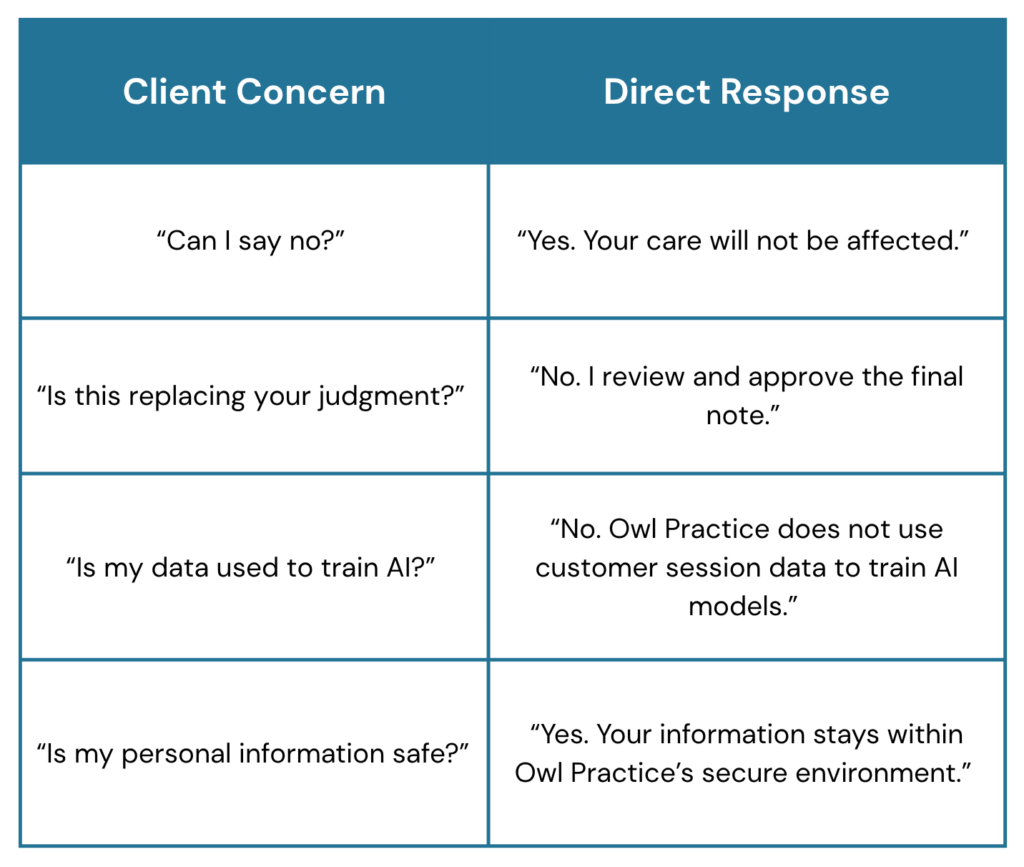
Common client concerns can be answered simply:
Consider Post-Session Dictation with Smart Notes
Post-session dictation with Smart Notes gives you a flexible alternative when a client does not consent to recording and transcribing with Smart Notes.
Instead of recording the therapy session, you dictate your own summary after the appointment and upload that file to generate a draft note.
You review, edit, and approve the note before it is finalized. This keeps you in control while still reducing documentation burden.
If you’re ever unsure how to respond to a client’s question, do not hesitate to reach out to Owl Practice’s Support Team for assistance! Clients may have misinformation about AI tools. We are more than happy to assist and help ensure that you and your client are confident in using Smart Notes.
Sending Client Consent Forms in Owl Practice
Owl Practice includes a ready-to-use consent form template specifically for Smart Notes. It is easy to send this to a client via email or the Client Portal when you’re ready to obtain consent.
The form supports informed consent, but it should not replace the conversation. A signed form may document consent, but the client still needs space to understand the tool, ask questions, and make a pressure-free decision.
What to Do If a Client Doesn’t Consent to an AI Notetaker
If a client does not consent to an AI notetaker, you should respect the decision without pressure and continue their care as usual. Clients should not be asked to justify their choice, and declining AI documentation should not affect the therapeutic relationship.
A simple response is often best:
“That’s completely okay. We do not have to use it. Your care will continue the same way, and I appreciate you letting me know what feels comfortable.”
You can continue with your usual note-taking process or use an alternative workflow that does not involve recording the session, like post-session dictation with Smart Notes.
Conclusion
AI notetakers like Smart Notes can help you reduce documentation burden, spend less time typing, and create draft clinical notes more efficiently. But in therapy, these tools need to be introduced with transparency, informed consent, and respect for client choice.
Clients should know what the AI notetaker does, why you are using it, whether recording or transcription is involved, how transcripts are handled, and what happens to the final note. They should also know they can decline without pressure.
When you explain the tool plainly, answer privacy questions honestly, and honour the client’s choice, AI-assisted documentation can support both better practice management and a stronger therapeutic relationship.
Owl Practice’s Smart Notes automate your note taking using privacy compliant AI, so you can spend more time with clients and less time on paperwork. Learn more about Smart Notes.
FAQs About AI Notetakers in Therapy
Do you need client consent to use AI notes?
Yes. You should obtain informed consent before using AI notes in a therapy session. Clients should understand whether recording or transcription is involved, how their information is handled, and that they can say no.
Can a client refuse an AI notetaker?
Yes. Clients can refuse an AI notetaker, and their care should not be affected. You can continue with your usual documentation process or use an alternative like post-session dictation.
Does Smart Notes replace your clinical judgment?
No. Smart Notes helps generate a draft clinical note, but you remain responsible for reviewing, editing, and approving the final note. It does not replace clinical judgment or make treatment decisions.
Can Smart Notes be used for teletherapy and in-person sessions?
Yes. For telehealth sessions in Owl Practice, you can select Auto-enable transcription when call starts or select Scribe during the session. For in-person sessions, you can use in-app recording from your laptop or upload a recording to Smart Notes.
Is customer session data used to train AI models?
No. Owl Practice does not use customer session data to train, fine-tune, or improve AI models, including third-party models. Smart Notes is built within Owl Practice’s secure, PIPEDA-compliant environment, and recordings, transcripts, and notes never leave the Owl platform.