
SCHEDULING
Simplify Scheduling and Reduce No-Shows
Scheduling should be simple, and with Owl, it is.
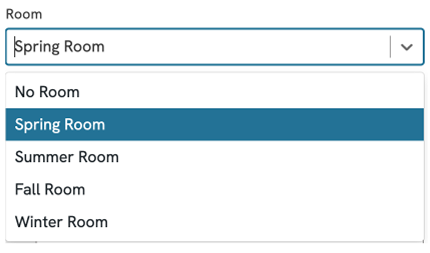
Never Have a Room Double-Booked Again
Multiple locations, zero hassle—everything stays in sync under one account.
Group practices can easily manage multiple clinics set up rooms, therapist schedules and invoices by site, and filter calendars and data by individual or all locations.
Smart room management allows you to create and assign specific rooms to avoid double-bookings.
Eliminate scheduling errors by assigning therapists a default room to speed up the booking process.
Your Calendar, Under Control
Flexible scheduling that adapts to your practice – not the other way around.
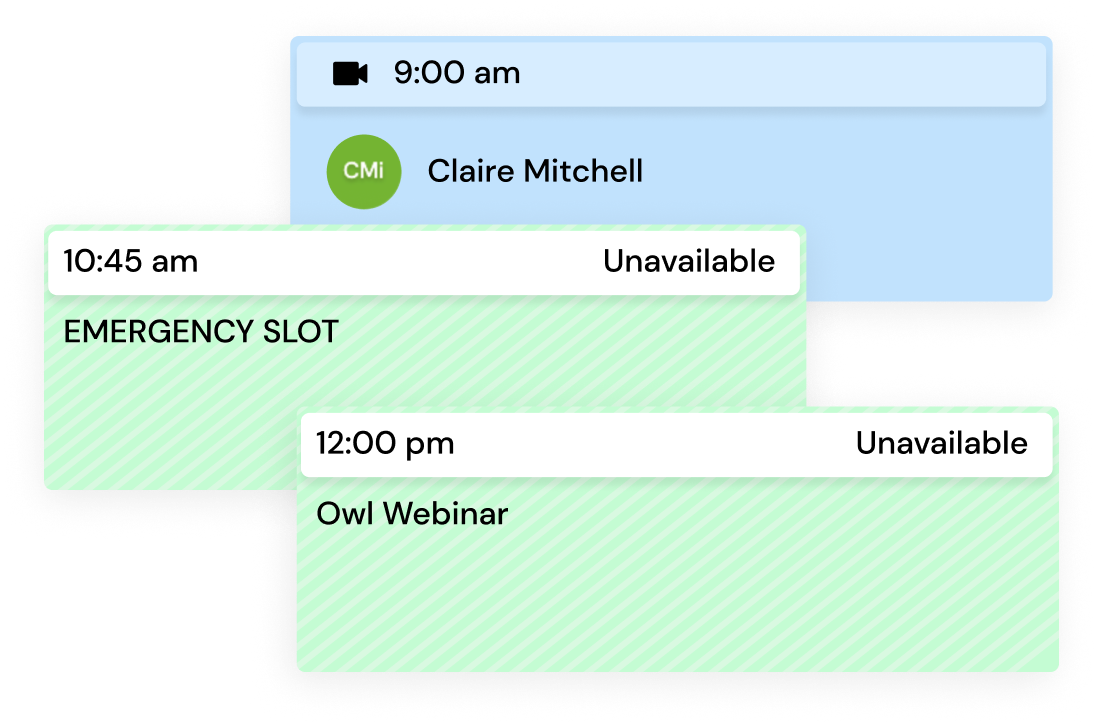
Real-time calendar syncing with Google, Apple or other calendars allows you to manage your schedule without ever logging into your account.
Protect your time and privacy by only showing open slots to clients and keeping the rest of your schedule private and conflict-free.
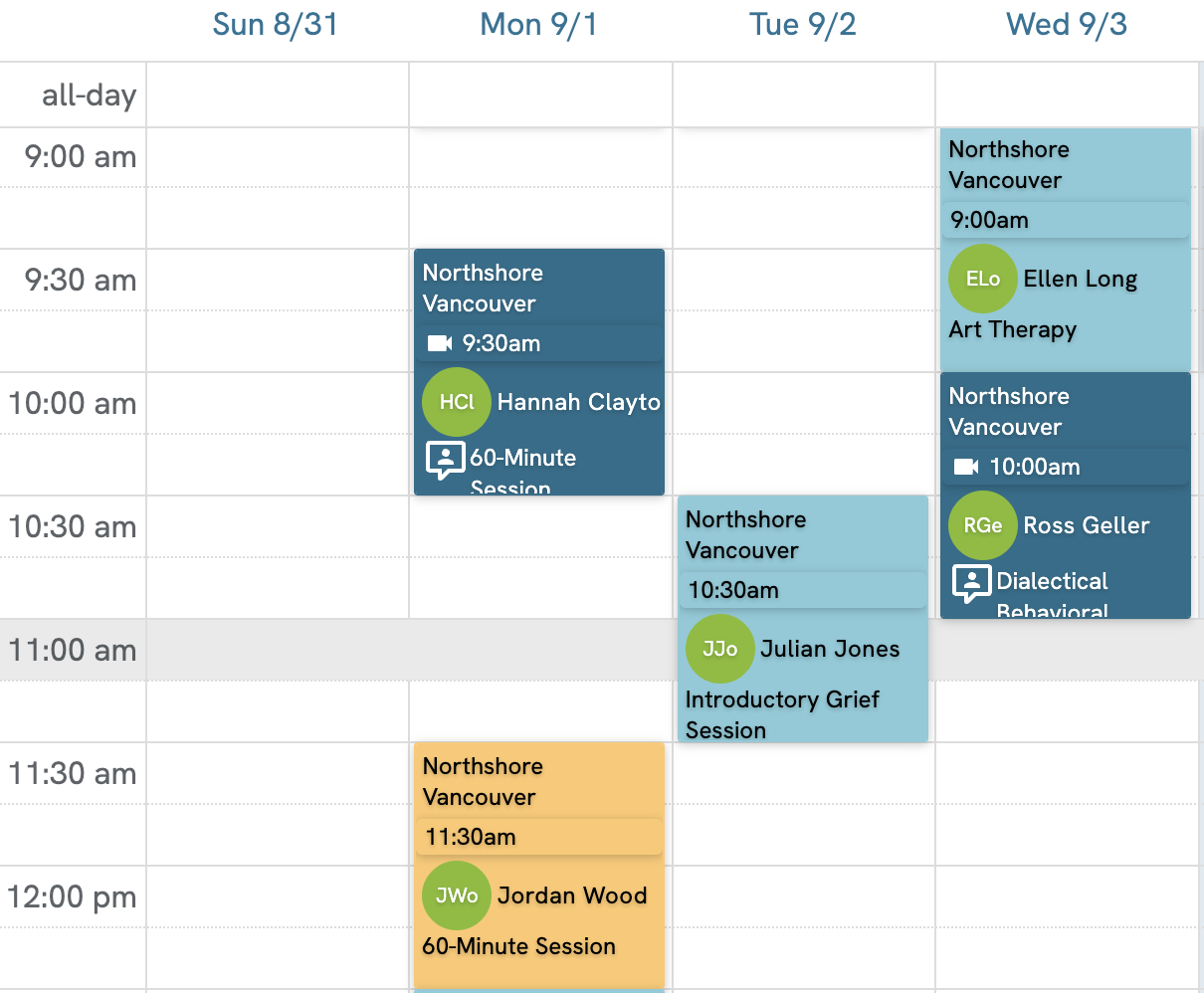
Stay organized with a customizable calendar and one-click access to view important client details right from the calendar.
Scheduling That Scales with Your Team
Keep practitioners, administrators and calendars in sync across your entire practice.
Get full oversight over your group practice or multi-location clinic with tools that allow you to manage everything from a single Owl Practice account – no more juggling systems.
With multi-therapist calendar functionality, you can view and manage all your therapists’ schedules in one place, making it easy to coordinate availability and room use across your team.
Give admin access without compromise by giving office admins the tools they need for scheduling and billing – while keeping clinical notes private and secure.
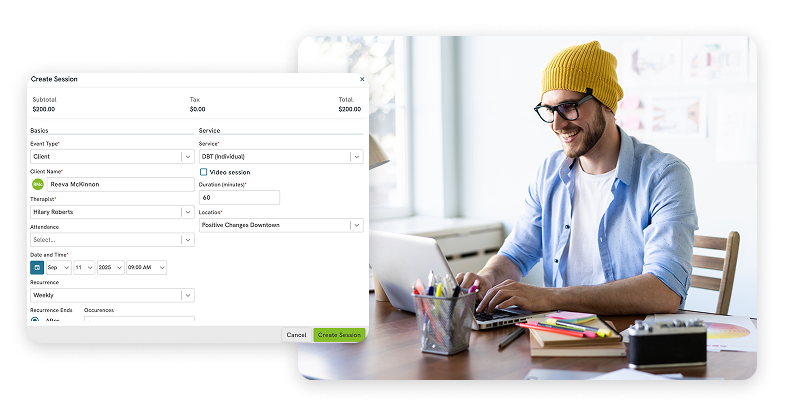
Say Goodbye to Back-and-Forth Emails
Clients can reserve sessions instantly and reoccurring appointments save you time.

Our customizable online booking tool allows you to personalize session types, therapist availability, appointment lengths, and locations directly from your online booking page.
Reserve regularly scheduled appointments for any type of session so that their appointment slot is always available in your calendar.
Client calendar sync allows your clients to have their sessions with you sync with their own calendar so that they never miss a session.
Automatic free SMS and email reminders reduce missed appointments with timely reminders sent directly to your clients’ phones and inboxes.
Want to see our Calendar & Scheduling Software in action?
Let one of our dedicated Practice Consultants take you on a live demo and get the answers you need.
FAQs
Owl Practice allows one-way sync with all major calendar systems. This means that your Owl Practice events can be exported into the third-party calendar without showing client-identifying details. However, due to our strict compliance standards, our system can’t import events from other calendars.
Yes-as soon as a room is reserved, it no longer shows as available for others in the practice to book into at that time. There is also a Rooms view on the calendar, so everyone at the practice can see what time the room will be available again.
Online Booking has several settings that allow Therapists to customize their calendars and what their clients see. Clients can only see the available times the Therapist has, no details of the rest of their schedule. This can be limited to days of the week and times of the day on a therapist-and-service basis. It doesn’t matter how specific your schedule is, our team can make sure the system works for you.
To reduce missed sessions, consider sending automatic appointment reminders via email or text, which helps clients keep track of their scheduled times. Offering video sessions as an alternative can also be beneficial when clients are running late or unable to attend in person.
Yes, you should let clients schedule their own appointments. Clients are more likely to remember sessions they book themselves, and it saves you and your practice time by reducing scheduling conversations.
This kind of integration has several benefits. Real-time calendar integration reduces stress for mental health professionals by providing accurate and up-to-the-second availability. This integration also provides breathing room by eliminating the need to check multiple calendars and preventing scheduling overlaps. Additionally, it allows for steadier focus by reducing time spent on scheduling questions and supporting consistent care for clients through automated reminders.
To create a custom booking experience, focus on providing clarity and demonstrating professionalism, which is especially important in mental health. Owl Practice allows you to personalize session types, appointment lengths, and locations, all while syncing in real time with calendars like Google and Apple. Clients can then book, reschedule, or cancel appointments online anytime, with automated reminders to reduce no-shows and protect your privacy by showing only open time slots.
To secure your therapy calendar, anonymize client information if you must view it on a non-secure calendar, such as using a three-letter client code. Avoid using full client names, phone numbers, or any notes related to their diagnosis or treatment in a generic calendar application. Instead, use a purpose-built practice management system as the secure “home base” for all client data. Do not rely on a personal, stand-alone calendar to run your practice.
Online booking eliminates back-and-forth emails and phone interruptions during sessions, greatly reducing administrative work for both solo practitioners and reception staff. This efficiency allows you to concentrate on patients rather than the mundane, time-consuming task of calendar management, often enabling you to see more clients in a day. Online booking also meets modern client expectations for 24/7 scheduling availability, as clients increasingly prefer booking appointments during off-hours rather than calling during business hours.
The majority of therapy sessions occur during daytime hours, with only 21% of sessions taking place in evenings after 5 p.m. and just 2% occurring before 9 a.m. The average practice schedules only three evening sessions per week, with Tuesday being the busiest day (23% of weekly appointments) and Friday the slowest (13%). Interestingly, no-shows and late cancellations occur 25% more frequently during daytime appointments than after 5 p.m., suggesting evening clients are better at sticking to their commitments.
Related Articles

Top Organization Tips for Solo Practitioners
Do you ever feel your practice is cluttered? Keep organized! Owl Practice specializes in helping practices of all sizes keep everything organized. Try for free!

What Does an Efficient Therapy Practice Look Like?
An efficient therapy practice uses Owl Practice to automate bookings, reminders, invoicing, and record-keeping, saving hours monthly.

What Do You Need to Know About Running a Private Practice?
Learn to run a successful private therapy practice. Owl Practice offers Canadian therapists tools for billing, scheduling, privacy, marketing & growth.
See all Owl Practice Features that Improve Client Experience
Clinical Records
Easily organize your client data, intake forms and invoices by digitizing your filing cabinet.
Reporting Dashboard
Gain valuable insights into your revenue and session metrics through the dashboard.
Integrated Payments
Make chasing down payments a thing of the past. Payments process automatically saving you even more time.
Session Notes
Save time with customizable and intuitive note-taking tools. Enjoy templates created by therapists for therapists.
Try Owl Practice Free for 14 Days!
Join the thousands of mental health professionals across Canada using Owl Practice to run their private practice.
